

Make your plan
GridZeno makes the plan itself. Under Automatic you decide what it may do, in the Plan tester you try other choices on days that have passed, and with Pro you make your own rules under Rules. Everything is saved straight away, and the plan is recalculated.
Who controls the system?
The main switch. It decides whether GridZeno may change anything on your inverter.
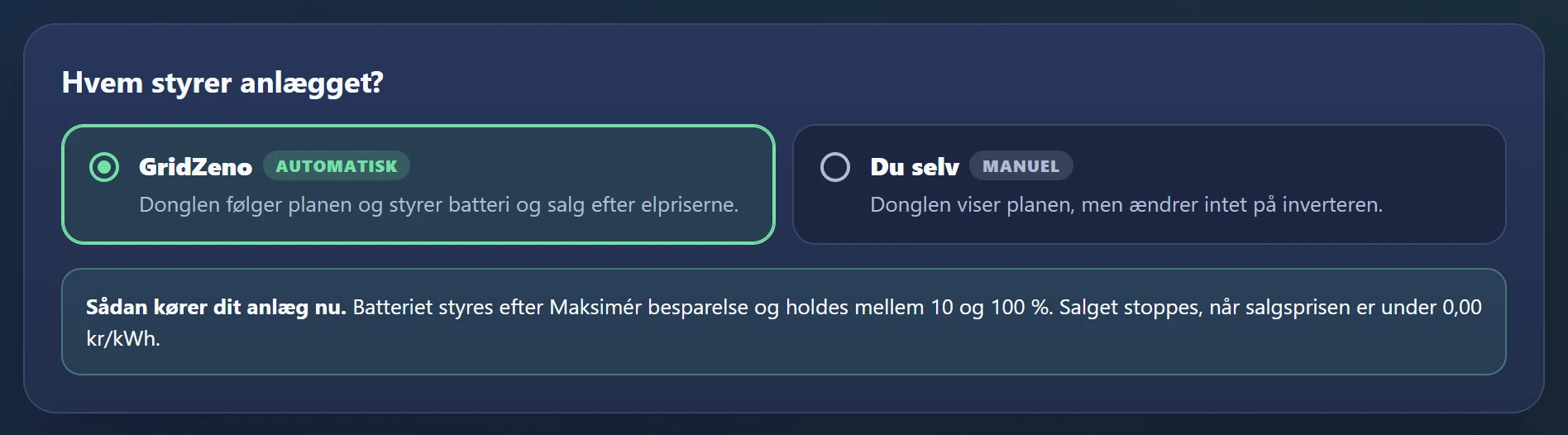
- GridZeno (Automatic)
- The dongle follows the plan and controls the battery and selling according to the electricity prices.
- Yourself (Manual)
- The dongle shows the plan, but changes nothing on the inverter. The inverter runs on its own settings, and your choices below are only used when GridZeno is in control again.
Below the choice, it says in plain words how your system is running now. Feel free to start on Yourself, and read the plan for a few days. When you can see that it does what you would have done yourself, you choose GridZeno. You can switch at any time, also from Overview, and you get a message when the control switches, if you have turned it on under Notifications.
Where to find it: Settings, Automatic.
What should the battery aim for?
The strategy is the basic approach the rest of the plan works from. Only shown when the system has a battery.
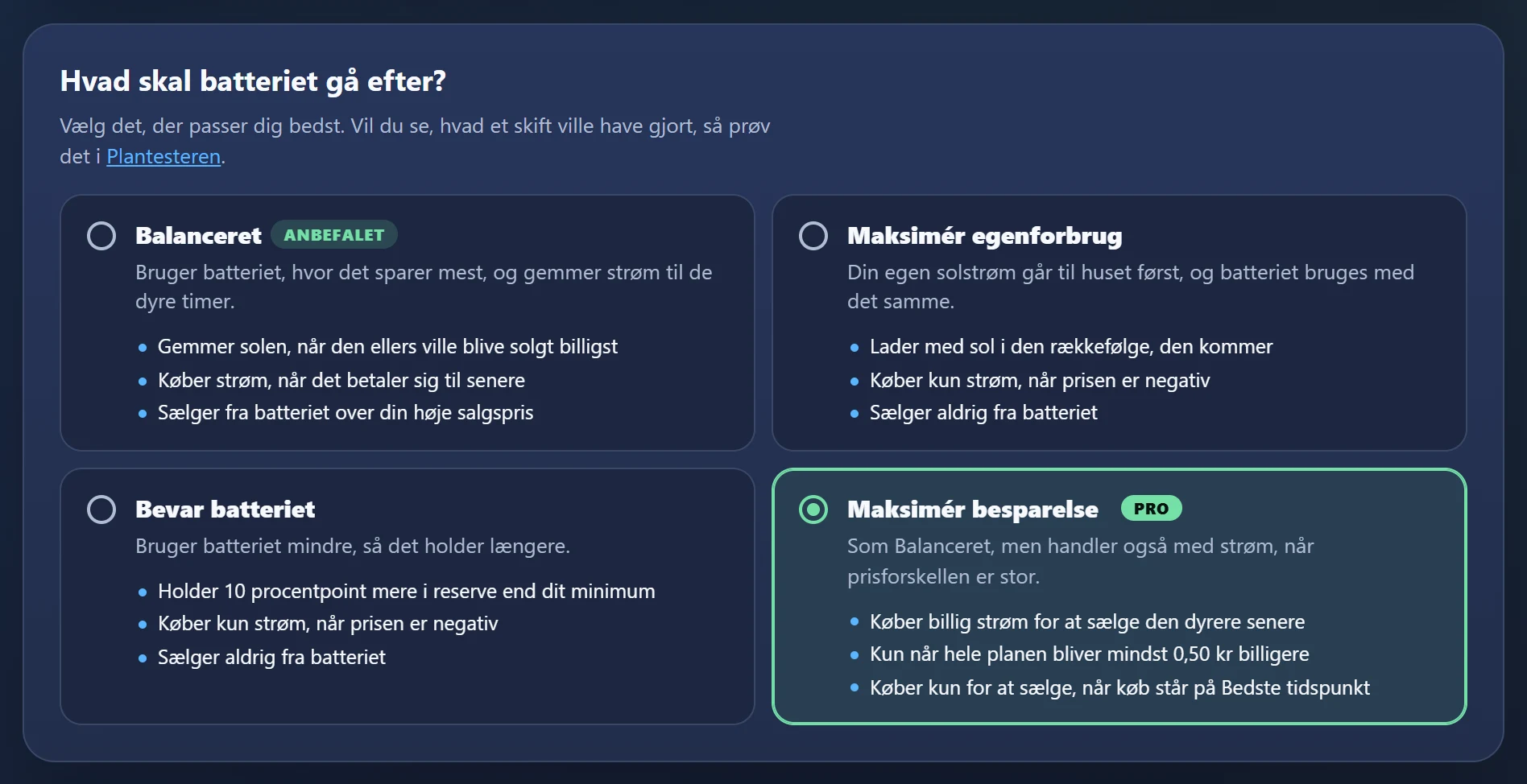
- Balanced
- Recommended. Uses the battery where it saves the most, and stores power for the expensive hours. With Pro it also buys power when it pays off, and sells from the battery above your high selling price. With Smart it only buys at negative prices and doesn't sell from the battery.
- Maximise self-consumption
- Your own solar power goes to the house first, and the battery is used straight away. Only buys power at negative prices and never sells from the battery.
- Preserve the battery
- Uses the battery less, so it lasts longer. Keeps 10 percentage points more in reserve than your minimum.
- Maximise savings
- Pro only. Like Balanced, but also buys cheap power to sell it at a higher price later, when the whole plan becomes at least DKK 0.25 cheaper.
Press a strategy to choose it. If you want to see what a change would have done, try it in the Plan tester first. Read more about the strategies.
The battery
Your limits, and when the battery may buy power.
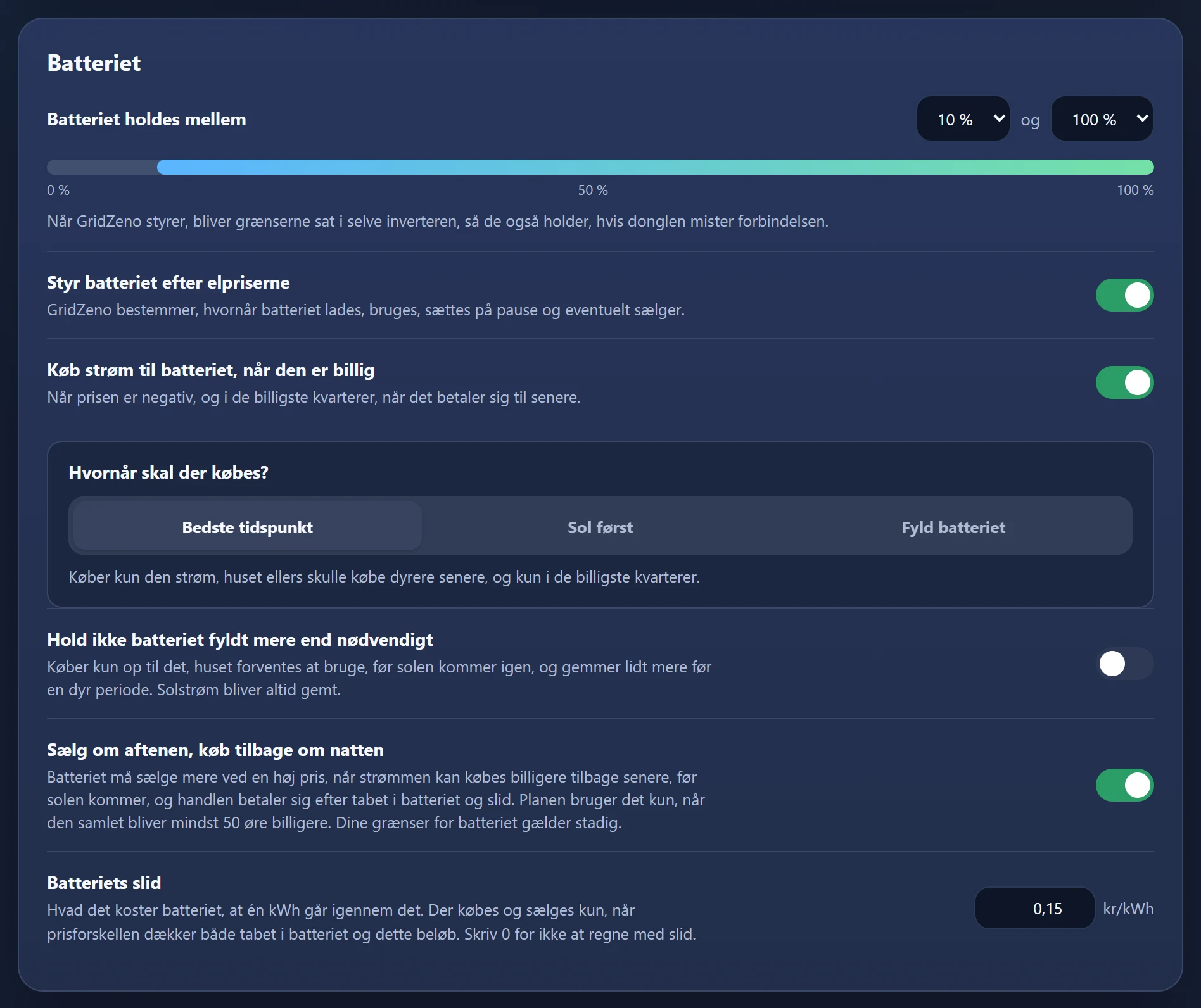
- The battery is kept between
- Choose the minimum and maximum. When GridZeno is in control, the limits are set in the inverter itself, so they also hold if the dongle loses its connection.
- Control the battery by electricity prices
- The main switch for the battery. On: GridZeno decides when the battery is charged, used, paused and possibly sells. Off: the battery is only charged with solar and used for the house.
- Buy power for the battery when it's cheap
- With Smart at negative prices. With Pro also in the cheapest quarter hours, when it pays off for later.
- When should power be bought?
- Pro only. Best time only buys what the house would otherwise have to buy at a higher price later. Solar first counts cautiously on the sun. Fill the battery fills it in the cheapest quarter hours.
- Don't keep the battery fuller than necessary
- Only buys up to what the house is expected to use before the sun comes back. Solar power is always stored.
- Sell in the evening, buy back at night
- Pro only. The battery may sell more at a high price when the power can be bought back cheaper before the sun, and it pays off after losses and wear. Only used when the plan becomes at least DKK 0.25 cheaper.
- Battery wear
- What it costs the battery for one kWh to pass through it. Power is only bought and sold when the price difference covers both the loss and the wear. Enter 0 to not count wear.
Grid export
What happens to the power the house and the battery don't use.
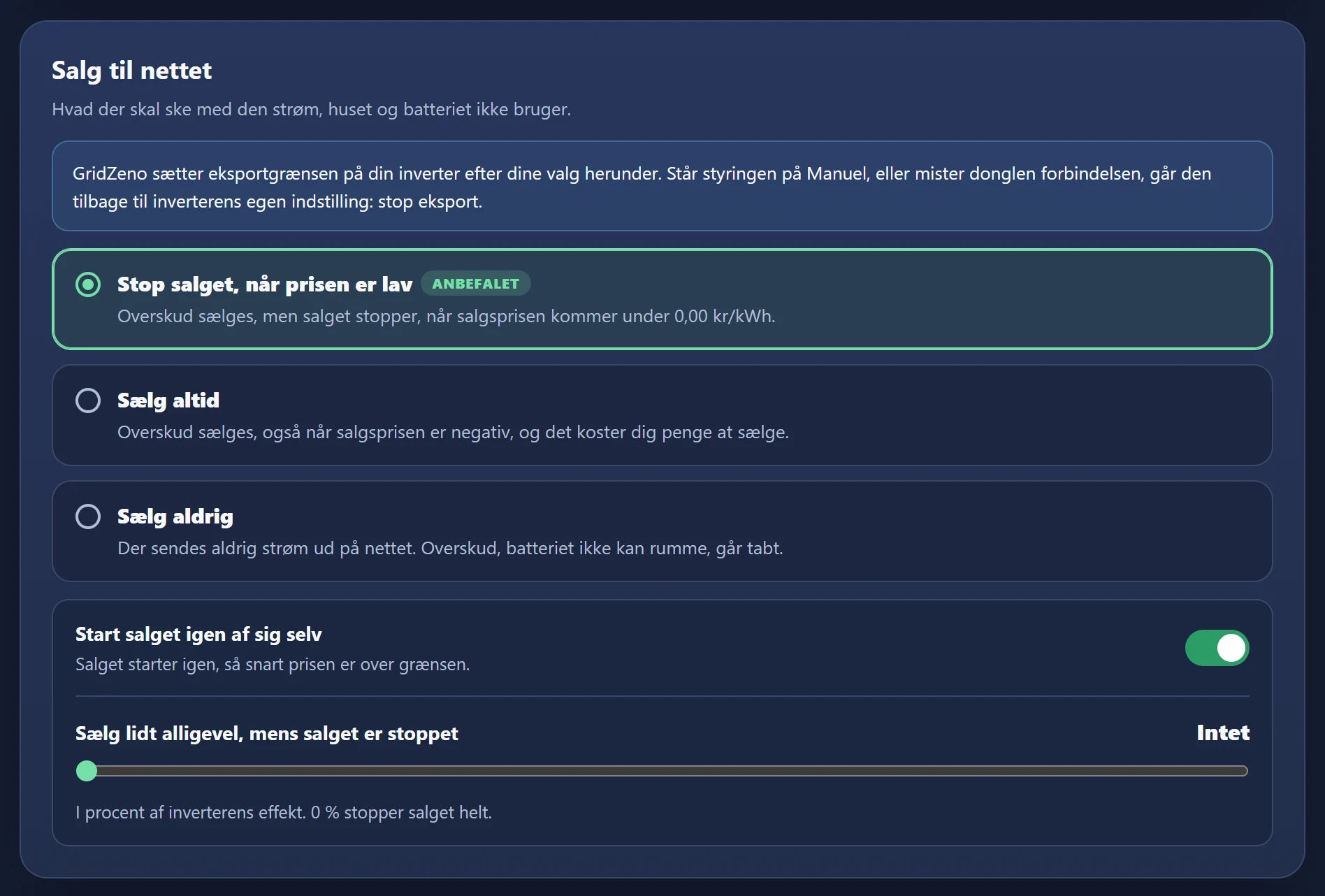
- Stop selling when the price is low
- Recommended. Surplus is sold, but selling stops when the selling price falls below your low selling price.
- Always sell
- Surplus is sold, also when the selling price is below zero and it costs you money.
- Never sell
- Power is never sent out. Surplus the battery can't hold is lost.
- Restart selling by itself
- Selling starts again as soon as the price is above the limit. If you turn it off, selling stays stopped until you press Restart selling here yourself.
- Sell a little anyway while selling is stopped
- As a percentage of the inverter's power. 0 % stops selling completely.
The top of the card shows how your inverter itself is set. If GridZeno controls the inverter's sale limit, it goes back to the inverter's own setting when the control is set to Manual, or the dongle loses its connection.
Your price limits
When a selling price is low, and when it's high.
- Low selling price
- Below this price, selling is stopped if you have chosen Stop selling when the price is low. Also used for the message Low selling price tomorrow.
- High selling price
- With Pro, the battery may sell above this price under Balanced and Maximise savings when it pays off after losses and wear. The house keeps what it needs before the sun comes back. Also used for the message High selling price tomorrow.
The limits are shown as dashed lines on Electricity prices when you look at the selling price.
More control
Two switches with Pro.
- Use your own rules
- Your rules from the Rules page are used in the plan. Off: the rules are saved, but not used. It's the same switch as Use your rules on the Rules page.
- Plan all of tomorrow as well
- When tomorrow's prices are out, normally around midday, all of tomorrow is planned as well. Otherwise the plan looks 24 hours ahead.
If the dongle loses its connection
The dongle fetches a new plan every quarter hour. If it hasn't had one for 45 minutes, it does what you choose here.
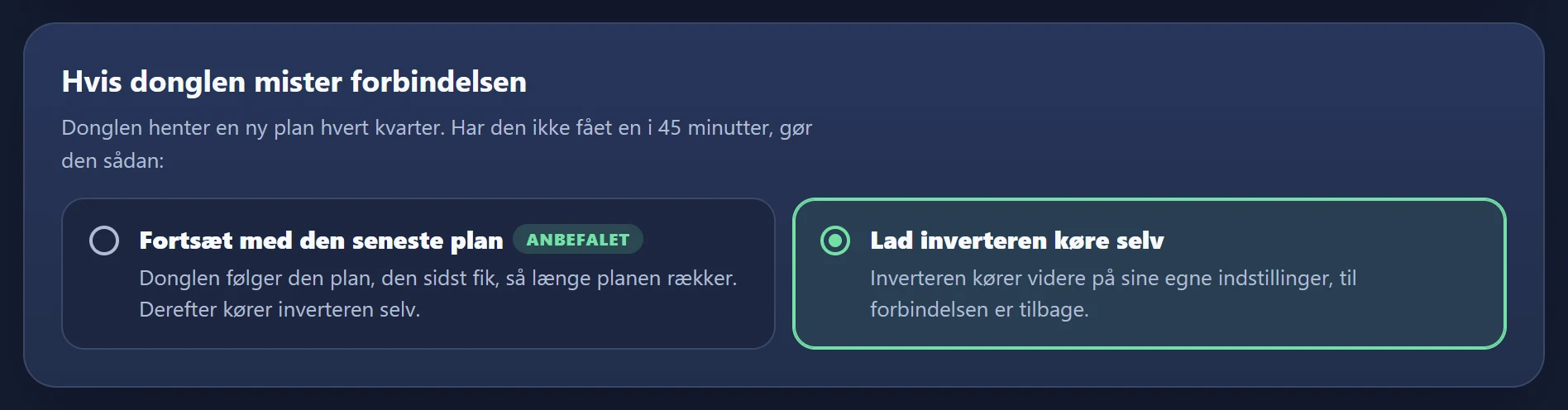
- Continue with the latest plan
- Recommended. The dongle follows the plan it last received, for as long as the plan lasts. After that, the inverter runs on its own.
- Let the inverter run on its own
- The inverter carries on with its own settings until the connection is back.
The battery's limits are written to the inverter itself, so they hold whatever you choose.
Plan tester
Try other settings on days that have passed, and see what the plan would have done, what it would have cost, and what it would have meant for the battery.
- 1Go to Plan tester
Under System in the menu. The form starts with your current settings.
- 2Choose Day and Period
A day up to 31 days back, and Only that day, 7 days or 30 days up to that day.
- 3Change the settings
Strategy, charging from the grid, battery reserve, upper limit and, with Pro, the price above which the battery may sell. The switches for buying at low prices, stopping at a negative price and stopping all export match the choices under Automatic.
- 4Press Calculate
GridZeno calculates the plan with the day's real sun, consumption and prices, with your settings and with the new ones. With several days, you see how far it has got, and you can press Stop.
- 5Read the result
How much more or less the new plan would have saved, what it would have done, pros and cons, and a table with bought, sold, savings, battery wear and switches on the inverter.
- 6Press Use these settings on my system
If you like the result. You see the changes before you confirm with Use the settings. It changes the same things as the Automatic page, and the plan is recalculated straight away.
Your own rules
Fixed requirements that the plan always keeps, for example a full battery at 17:00 on weekdays. The plan finds the cheapest way around them by itself.
- 1Go to Rules
Under Settings in the menu. The page is only available with Pro.
- 2Switch Use your rules on
At the top of the page. When it's off, all your rules are paused without being deleted.
- 3Press New rule
If you have no rules, you can also start from one of the examples, for example Full battery at 17:00 on weekdays.
- 4Choose what the rule should do
Eleven types in four groups: Battery level, Charging from the grid, Use of the battery and Grid export. Rules about the battery require a battery.
- 5Enter how much
For example at least 80 % in the battery, keep at least 30 %, or at most 3 kW.
- 6Choose When?
No later than for a rule with a time of day, otherwise In a time window or Around the clock. A time window across midnight belongs to the day it starts.
- 7Choose Days
Press the days, or use All days, Weekdays or Weekend.
- 8Optionally a period
Switch Only for a period on, for example while you're on holiday.
- 9Optionally Only when…
A condition, for example that the buying price is below an amount, that the day's solar forecast is low, that DMI warns of severe weather, or that the house uses more than a number of kW.
- 10Press Save rule
Above the button, the rule is shown as one sentence, so you can check it. The plan is recalculated straight away.
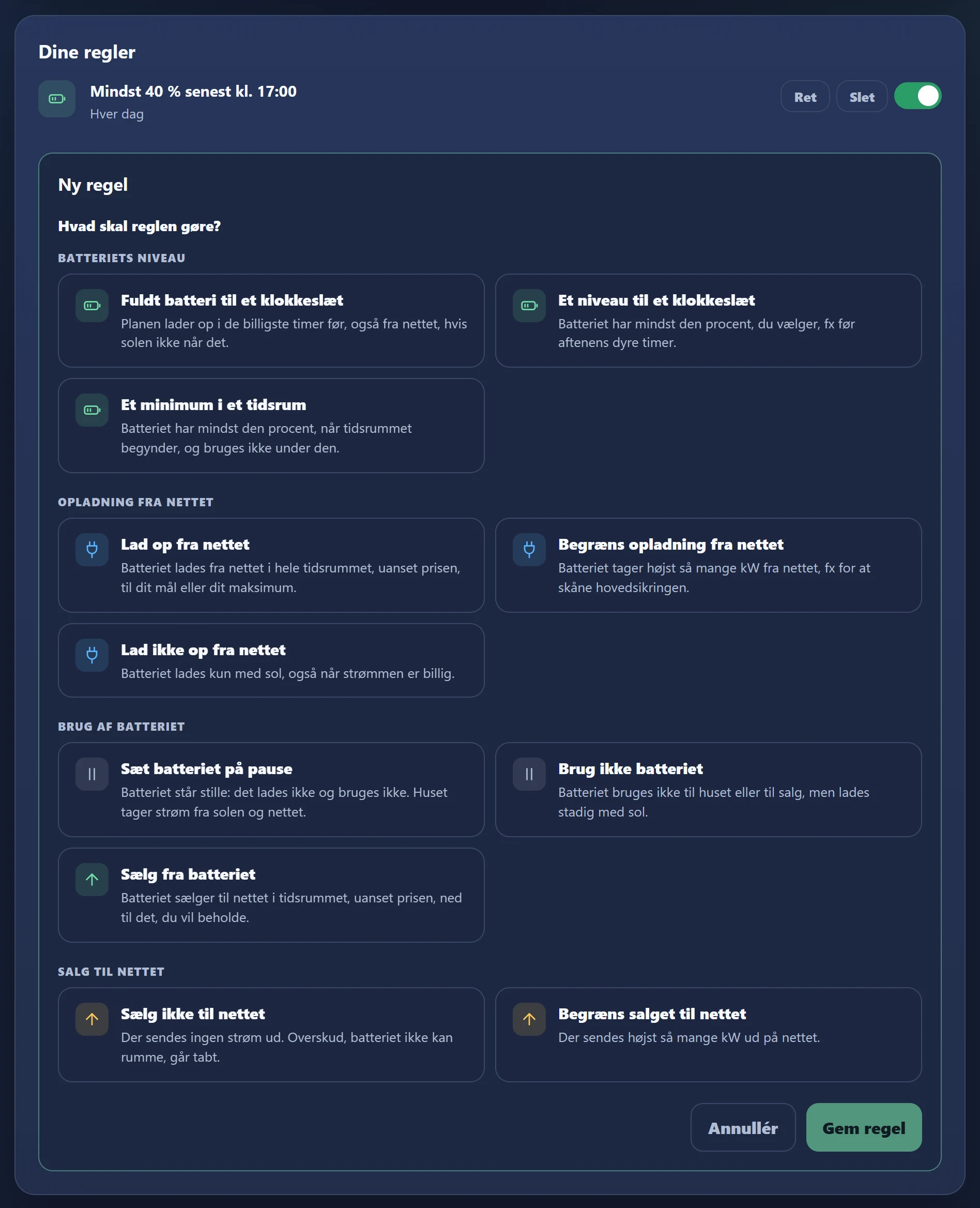
Each rule is shown as a card with Edit, Delete and a switch to turn it on and off. If Not used appears on a card, it says why, for example that Control the battery by electricity prices is turned off under Automatic. If the plan can't keep a rule, it says so at the top under The plan can't keep this right now.
Which conditions fit which rules
A rule can have at most one condition. Here are the ones that fit each rule. "Measured" means that the dongle decides it from the measurement right now.
- Fully charged battery by a set time
- Solar forecast below
- At least X% by a set time
- Solar forecast below
- At least X% in a time window
- Solar forecast below
- Severe weather warning
- Charge from the grid
- Buying price below
- Solar forecast below
- State of charge belowmeasured
- Hold the battery
- Selling price below
- Solar forecast below
- Consumption abovemeasured
- State of charge belowmeasured
- Sell from the battery
- Selling price above
- No discharging
- Consumption abovemeasured
- State of charge belowmeasured
- Don't sell to the grid
- Selling price below
- Limit selling to the grid
- Selling price below
- Max. charging from the grid
- No condition. The rule is controlled by time window, weekdays and period.
- No charging from the grid
- No condition. The rule is controlled by time window, weekdays and period.
A ban always wins, and a hold wins over charging and selling. Two identical rules at the same time: the highest minimum and the lowest ceiling apply. Your limits under Automatic still apply. The house's consumption and the battery level are measured by the dongle, which decides for itself after two measurements in a row.
Ready for cheaper
power?
Check whether your inverter fits, and let the plan charge the battery and sell power in the right quarter hours.